Evolve & Survive Controls
Move, eat, open Shop, and stop fat-fingering Index mid-chase.
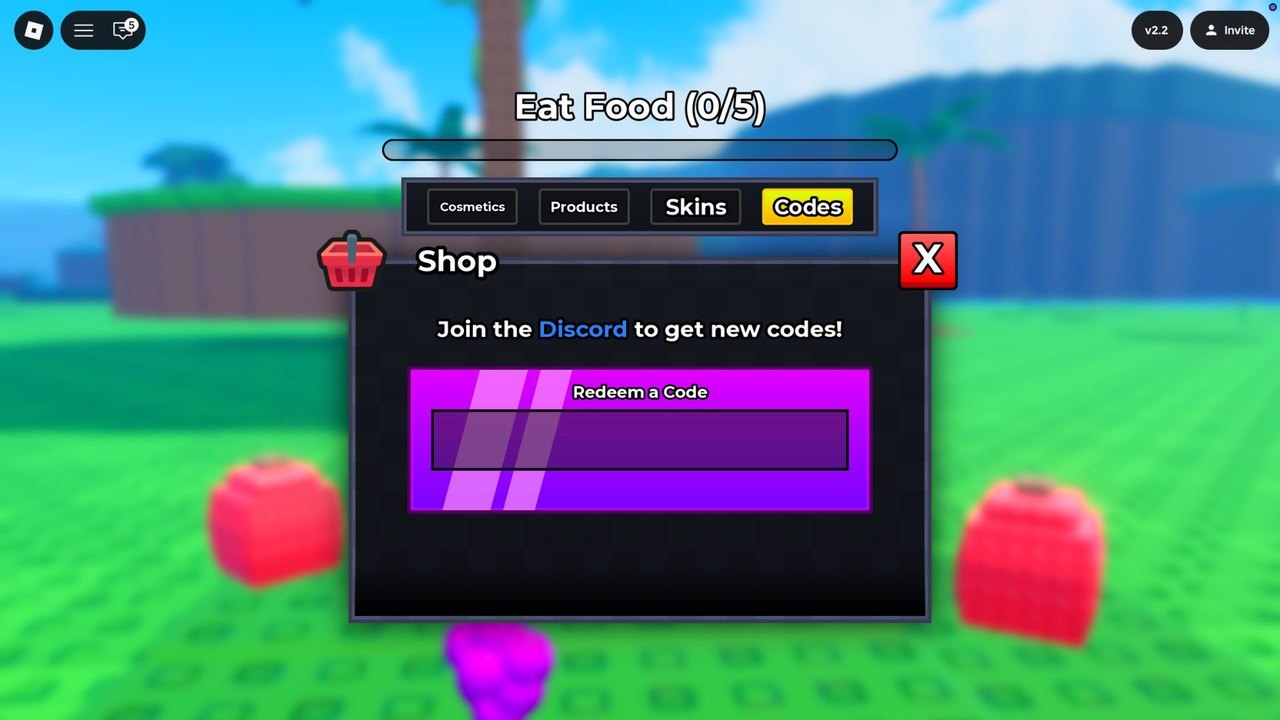
Evolve & Survive uses standard Roblox movement plus a custom left rail. Deaths that feel like “the game ate my input” are usually a thumb on Shop or a camera stuck in a cactus. This page is the input half of how to play. It will not make a worm beat a mantis. It will keep you from opening Bag while a centipede closes.
PC defaults
Roblox keyboard movement applies:
- WASD — walk. The voxel lawn has no slide if you release keys.
- Space — jump. Useful for reading the Eat Food bar over a hill, not for dodging a scorpion tail.
- Mouse — camera. Keep the horizon level so you can see long bodies coming.
- Shift (if enabled in Roblox settings) — sprint. Turn it on. Prey lives on sprint.
- Left rail clicks — Shop, Ready, Index, Bag. These are mouse targets, not keybinds.
Open Shop only when you are behind cover or at spawn. Redeeming codes at the worm lawn is safe. Opening Cosmetics in the desert is how you donate a beetle.
Enter is the confirm key on the Codes tab. There is no separate Redeem button in v2.2. See how to redeem if paste fails.
Mobile
The left rail sits under a left thumb. That is the main mobile problem.
- Move the joystick with the left thumb, camera with the right. Do not park the joystick on Shop.
- Eat Food pickups are walk-over. You do not need a use button for red cubes or purple fruit.
- Shop, Ready, Index, and Bag are large enough to tap, which means they are large enough to mis-tap during a chase.
- After a knockout, wait a beat before mashing Ready. Ready is not respawn.
If your device shows a tiny Codes field, rotate to landscape. The purple Redeem a Code box is easier to paste into when the Shop window is wide.
Console
Use the Roblox virtual cursor for the left rail. Analog movement is fine on open lawn and painful in cactus biomes — camera first, then stick. Code entry is the weak point. Update3 needs a capital U and a digit. Open the on-screen keyboard, paste if your platform allows it, and check the string before Enter.
Invite in the top right is a Roblox invite, not a combat emote. It will not pause the food chain.
Camera habits that win fights
Apex forms are long. Centipedes and scorpions occupy more horizontal space than a worm camera expects. Pull the camera up and back until you can see the whole predator. If you only see a head, you are already inside the bite.
On the beach, the water line hides turtles until they are close. Sweep the camera along the shore before you nibble fruit.
In canyons, do not hold the camera against a wall. You need the skyline to spot beetles on ridges.
UI buttons you should not treat as combat
- Shop — Cosmetics, Products, Skins, Codes. Economy only.
- Ready! — claim/gift. Ignore during a hunt even if it badges.
- Index — Evolvedex portraits. Check after a morph, not during.
- Bag — inventory. Close it.
- Version chip — v2.2 as of the screenshots we captured. Useful for updates, useless in a duel.
If a button ever overlaps your movement stick after a Roblox UI scale change, lower the on-screen joystick in Roblox settings. This wiki cannot patch Roblox chrome.
Accessibility and session comfort
The experience is tagged mild violence. Flashing is limited compared to horror titles, but desert sunsets and glowing eyes still strobe on some phones. Lower brightness if you grind XP routes at night.
There is no voice chat on the Roblox page. Coordinate through the Discord if you want callouts, not in-game VC.
Practice routine
Spawn, redeem codes, finish Eat Food, then spend two minutes only on camera: circle a tree, pan a canyon, track one ant without opening Shop. Then read how to evolve and take your first morph. Controls are solved when you can eat five pickups without touching Index.
Frequently Asked Questions
Quick answers players search before they jump back into a server.
What are the Evolve & Survive controls on PC?
WASD to move, mouse to look, left rail for Shop and Index, Enter to confirm codes.
Why do I keep opening Shop on mobile?
The Shop icon sits under the left thumb. Shift your joystick inward and keep Shop closed during chases.
Is there a use key for food?
No. Walk into red cubes and purple fruit. The Eat Food bar counts them automatically.
How do I enter codes on console?
Open Shop → Codes, then the on-screen keyboard. Watch capitalization on Update3.