How to Redeem Evolve & Survive Codes
Shop on the left, Codes in yellow, paste, then Enter.
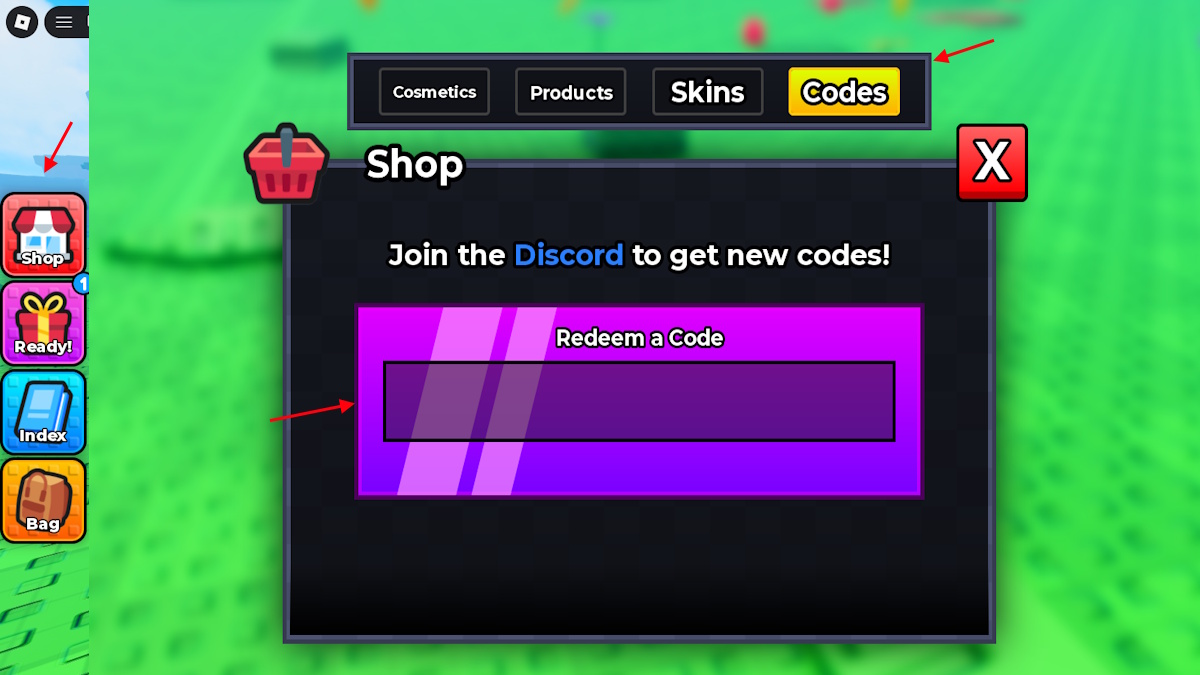
Redeeming codes in Evolve & Survive takes less than a minute once you know which button is Shop and which tab is Codes. The UI hides the box behind a yellow Codes chip inside a larger Shop window, so new worms often tap Skins or Products and assume the game has no code system. This page walks through the exact layout on PC and mobile as it appears in version v2.2.
Have the working codes list open in another tab so you can paste Update3, 2kLikes, and 1kLikes without retyping. Then come back here if Shop rejects a string.
Find Shop on the left rail
After the experience loads you should see a vertical stack of circular buttons on the left edge of the screen:
- Shop — storefront icon. This is the only door into codes.
- Ready! — gift box. Sometimes shows a notification badge. This is not the code box.
- Index — book icon. This is the Evolvedex, covered in the Evolvedex guide.
- Bag — backpack. Inventory, not promo codes.
Tap or click Shop. A dark window titled Shop opens in the center of the voxel lawn. Red food cubes may still sit in the grass behind it; you can eat those after you claim rewards.
Switch to the yellow Codes tab
The Shop header has four chips in a single row:
- Cosmetics
- Products
- Skins
- Codes (yellow background)
Codes is the right-most chip. It is the only tab that shows the purple Redeem a Code field. Cosmetics and Skins spend Gold. Products lists Robux bundles. None of those three tabs accept Update3.
Above the input, the game prints Join the Discord to get new codes! The word Discord is highlighted. That is the same server we document on the Discord page. There is still no official Trello; do not hunt one while the box is open.
Paste and press Enter
Click the purple field labeled Redeem a Code. Paste one string. Press Enter on a keyboard. On mobile, tap the on-screen confirm/return key after the paste. Rewards credit immediately if the code is live and unused on that account.
Repeat for every string on the codes hub. Order does not matter. Update3 can go first or last. Each code is single-use per account.
If nothing happens, look for a small error toast. Invalid, expired, and already-redeemed all fail silently-looking on some devices, so check your Gold and Revive counts in Shop before you assume the paste worked.
PC, mobile, and console notes
PC: Mouse the left Shop button, click Codes, Ctrl+V, Enter. This is the fastest path.
Mobile: The left rail can sit under your thumb. Drag the Shop icon, then the yellow Codes chip. Long-press the purple field to paste. Avoid adding a trailing space from your keyboard suggestion strip.
Console: Use the Roblox on-screen keyboard. Codes such as Update3 mix letters and a digit. Confirm the capital U. Analog-stick typos are the main reason console players think a live code is dead.
You do not need a gamepass, a like, or a group join to open Codes. The tab is unlocked from the first spawn. You can redeem as a pink worm before Eat Food (0/5) is finished.
After a successful redeem
Gold appears in the Shop currencies. Revives sit in the resource that lets you stand back up after a knockout. Spend Gold later in Cosmetics, Products, or Skins, or hold it for wheel spins as explained in the gold and shop guide. Spend Revives only after you have a form worth protecting — see how to evolve and the revive planner.
Close Shop with the red X. The Eat Food bar is still at the top of the HUD if you have not eaten five pickups. Codes do not complete that objective.
When a code fails
Work the list in this order:
- Confirm you are on the Codes tab, not Skins.
- Strip spaces and punctuation. The live codes have no spaces.
- Match capitalization from the codes hub.
- Check expired codes. 500Likes, UPDATE2, and SpinTheWheel no longer pay.
- Confirm you did not already redeem it on this account.
- Rejoin the server once. Shop can desync after a long session.
If every live code already sits on your account, you are done until Structa ships another likes milestone or an Update4-style patch. Watch updates and Discord rather than guessing new strings.
Pair codes with the first-hour loop
A stack of Revives is wasted if you still do not know when to run. After redeeming, follow getting started into combat. Use the early-game tier list so you do not spend a Revive defending a worm against a centipede.
Codes are a head start, not a win button. The Shop is generous. The desert is not.
Frequently Asked Questions
Quick answers players search before they jump back into a server.
Where is the code box in Evolve & Survive?
Left rail Shop button, then the yellow Codes tab. The purple Redeem a Code field only exists on that tab.
Do I press a Redeem button?
Press Enter after pasting. There is no separate confirm chip on the Codes tab in v2.2.
Can I redeem on mobile?
Yes. Open Shop, tap Codes, paste into Redeem a Code, then the keyboard return key.
Why does Shop show Cosmetics instead of Codes?
You are on the wrong tab. Slide to the yellow Codes chip on the right of Cosmetics, Products, and Skins.